MadMapper vs HeavyM vs Resolume


I have been running shows with Resolume Arena, MadMapper, and HeavyM since 2013. I have built hundreds of projection mapping installations, concerts, and immersive experiences with all three — sometimes on the same stage. This is what I actually think about each one, and who should learn what first.
The Short Answer
All three are genuinely good. But they are built for three different types of people and three different types of work. Here is the fastest way to orient yourself before we go deeper.
MadMapper 6
Precision mapping, LED, DMX, laser, and full timeline-based shows. The most complete tool for production-grade work.
HeavyM
Draw shapes, drop effects, get results immediately. The easiest entry point — no technical background required.
Resolume Arena
Real-time visual mixing designed like an instrument. The industry standard for VJs performing at concerts and festivals.
Side-by-Side Feature Comparison
| Feature | MadMapper 6 | HeavyM | Resolume Arena |
|---|---|---|---|
| Purpose-built for projection mapping | ✔ Yes — core focus | ✔ Yes — simplified | △ Arena only, secondary |
| Starting point workflow | Draw surfaces, map content to them | Connect projector, draw directly on real world | Build composition, route to Advanced Output |
| Space Scanner (auto surface calibration) | ✔ Native — game changer | ✘ Not available | ✘ Not available |
| LED display processor mapping | ✔ Native | △ Basic | △ Partial (Arena) |
| DMX lighting control | ✔ Native | △ ArtNet partial | ✔ Arena only |
| Laser control | ✔ Native (MadLaser) | ✘ No | ✘ No |
| Timeline-based show building | ✔ Full timeline + cues | △ Sequence-based, basic | ✘ Not native |
| Live real-time mixing (DJ style) | ✘ Not its strength | △ Limited | ✔ Best in class |
| Built-in effects library | △ Material library (rich) | ✔ 1,200+ built-in effects | ✔ 100+ + marketplace |
| Community & user network | △ Smaller — users are quiet | △ Moderate | ✔ Enormous — forums, Slack, FB groups |
| Mac & Windows support | ✔ Both | ✔ Both | ✔ Both |
| Apple Silicon (M-series) optimized | ✔ Yes | ✔ Yes | ✔ Yes |
| Approximate price | ~€449 one-time | €199–€399 | €799 (Arena) |
| Best suited for | Installations, structured shows, complex geometry | Beginners, quick setups, small events | Live VJ performance, concerts, festivals |
What Each Software Actually Does
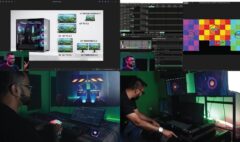
I tested all three on the same physical installation — the same white boxes, the same projector, the same music. Here is what the experience of actually using each one looks like in practice.
HeavyM — Start Drawing
Easiest to start Fastest results Built-in 1,200+ effects
HeavyM is different from the other two at a fundamental level: you begin by connecting your projector and drawing shapes directly onto the real-world surface in front of you. There is no composition setup, no input/output routing, no reference photo needed. You draw. You drop an effect. It works.
This is genuinely remarkable when you first experience it. The snap tool makes drawing precise, the built-in effect library is enormous and beautiful, and sound reactivity is automatic. In my test on the same installation, I was producing visible results in HeavyM while I was still setting up my reference photo in Resolume.
Where HeavyM shines:
- Small to medium setups where you need results quickly
- Events where you are not preparing your own video content — the library handles it
- Creative professionals who are not technical nerds and do not want to become one
- Low CPU and GPU consumption compared to the other two
- Real-time GLSL shaders — the shader quality is genuinely stunning
Where HeavyM runs out of road:
- Complex geometry and multi-projector blending requires the Pro tier
- No timeline for fully scripted, cued shows
- You are working inside the library’s creative direction — custom looks take more effort
- Project reuse is not really the workflow. Each show is better built fresh
HeavyM discount: I am a HeavyM ambassador. Use code ZUNAYED15 at checkout for 15% off — heavym.net
Resolume Arena — Perform Your Visuals
Live performance DJ-style interface Massive community
I started my VJ career with Resolume Arena in 2013. It was the software that opened projection mapping to me. Resolume feels like an instrument. You load video clips into a grid, layer them, mix them in real time, and trigger effects while music plays. It is expressive and fast in a way the other two are not.
Projection mapping in Resolume lives inside the Advanced Output module — you define slices of your composition and warp them onto physical surfaces. The setup workflow for complex geometry is more time-consuming than MadMapper. In my test on the same installation, the precise multi-surface geometry work that took me minutes in MadMapper took significantly longer in Resolume — requiring a reference photo, careful slice creation, input mapping, and output adjustment one surface at a time.
But once that geometry is set? The performance experience is unmatched. Switching between eight scenes to the same music felt natural in Resolume in a way that felt more like programming in MadMapper.
Where Resolume excels:
- Live VJ performance where you are mixing and responding in real time
- Audio-reactive visuals with direct music sync
- Expandability — Wire patches, third-party plugins, an enormous marketplace
- Collaboration between VJs who know the same interface
- Fixed-geometry stage designs where you map once and then perform
What Resolume does not do as well:
- Complex geometry setup — more time-consuming than MadMapper for irregular surfaces
- No native LED display processor mapping, no laser control
- No scripted timeline-based shows natively
- The most expensive of the three at €799 for Arena
- Cannot use Avenue (the cheaper version) for real projection mapping — you need Arena
MadMapper 6 — The Precision Tool
Complex installations LED + DMX + Laser Space Scanner
MadMapper has been my go-to for complex, precision installations since 2014. When the geometry is complicated — irregular architecture, objects with many faces, multi-projector setups that need to be perfectly calibrated — nobody does it better than MadMapper.
The standout feature, still, is Space Scanner. In my test: I connected a camera, pointed it at the installation, hit Space Scanner, and watched the projector throw lines and shapes while the camera captured and calculated. In under two minutes I had a perfect projector-perspective background to work from. In Resolume, the equivalent workflow — photo, cleanup, reference import, slice creation, input masking — took much longer for the same result.
Making a show in MadMapper in my test felt more like a coding or programmer interface than a performance interface. Scene building is deliberate and organized: you select a surface group, assign materials, tweak parameters, build scenes. It rewards structured thinking. The timeline workflow — especially at Level 2 — gives you genuine theatrical cue control over a show.
What makes MadMapper 6 the professional standard:
- Space Scanner — automatic projector-perspective calibration using any camera. A true game changer for complex installations
- Surfaces and groups — organize complex multi-face geometry cleanly and reuse it across scenes
- Full timeline and cue system — scripted shows with scene transitions, timing control, and keyboard triggers
- LED display processor mapping — native, not an add-on
- DMX integration — control lighting fixtures directly from your mapping session
- Laser control via MadLaser — the only one of the three that does this natively
- MiniMad — export your show to a small hardware device for permanent unattended installations
- Resolume integration — receive Syphon/Spout input from Resolume, giving you both in one rig
Where MadMapper has limits:
- Not a live mixer — there is no A/B crossfader for real-time performance the way Resolume has
- The user community is smaller and less visible than Resolume’s
- Project interface is locked — less flexible layout customization than Resolume
- A structured learning path matters more here — fragmented tutorials leave big gaps
These Tools Are Not Always Competitors
Something most comparison articles miss: professionals often use more than one. A common production workflow uses Resolume as the content engine — mixing clips, generating audio-reactive visuals — and sends that output into MadMapper via Syphon or Spout, where the precision geometry and multi-output routing handles the surface mapping.
You get the creative expressiveness of Resolume and the mapping precision of MadMapper in one rig. I have run this combination on shows and it is genuinely the best of both tools.
“If your mapping shapes are not that complicated and it’s a live show — go for Resolume. If your projection surface is complicated, if you want scene-like cues, if this is an installation — go for MadMapper. And if you want to have great fun without becoming a nerd about it — HeavyM.”
— Zunayed Sabbir Ahmed, 14 years of projection mapping shows and installationsWhich One Should You Learn First?
Learn HeavyM first if:
- You want visible results in a day and small events are your primary work
- You are not interested in deep technical workflows — and that is completely fine
- You want to try projection mapping before committing to deeper learning
- → Use code ZUNAYED15 at heavym.net for 15% off
Learn MadMapper 6 first if:
- You want to build real projection mapping skills that transfer to professional work
- Your goals include event design, installation work, AV production, or structured show building
- You want to work with LED, DMX, or laser alongside projection
- You want skills that scale — from a product launch to an architectural installation
Learn Resolume Arena first if:
- Live visual performance is your primary goal — VJing at shows, clubs, or festivals
- You want to perform visuals the way a musician performs with an instrument
- You are already a DJ or music producer — the interface will feel like home
- Real-time mixing matters more to you than structured show programming
MadMapper 6 Masterclass
Beginner to Intermediate
22 chapters · 5h 12m of step-by-step video · Tasks & example projects included
$349.00 — One-time payment Enroll on studio-Z.ca →Trying HeavyM first? Use promo code ZUNAYED15 for 15% off at heavym.net
Frequently Asked Questions
Which projection mapping software is best for beginners?
HeavyM is the most approachable entry point — you can produce visible results on day one without any prior knowledge. If your goal is professional-grade production, MadMapper 6 with a structured course is the better investment of learning time.
Can I use MadMapper and Resolume at the same time?
Yes. This is a common professional workflow. Resolume generates and mixes the visual content; MadMapper receives it via Syphon (Mac) or Spout (Windows) and handles the precision surface mapping and multi-output routing.
Is Resolume Avenue enough for projection mapping?
No. The Advanced Output module required for real projection mapping is only available in Resolume Arena. Avenue is the stripped-down version and does not support the features you need.
What is Space Scanner in MadMapper?
Space Scanner is MadMapper’s automatic surface calibration tool. You connect a camera, point it at your projection surface, and MadMapper uses structured light scanning to create a precise projector-perspective background for you to work from. It dramatically reduces setup time for complex geometry — something HeavyM and Resolume do not offer.
Do all three work on Mac and Windows?
Yes. Resolume Arena, MadMapper 6, and HeavyM all support both macOS and Windows, and all three are well-optimized for Apple Silicon (M-series chips).
Is HeavyM only for beginners?
Not exactly. HeavyM has real depth — MIDI mapping, ArtNet, real-time GLSL shaders, camera capture, and external video content. Professionals use it for quick-turnaround setups and gigs where setup time is tight. It is not only for beginners, but it is the most beginner-accessible of the three.
What do I need to learn MadMapper 6 from scratch?
No prior experience is required. The MadMapper 6 Masterclass by Studio Z starts from fundamentals — what projection mapping is, hardware requirements, software installation — and builds through geometry, scenes, timeline, LED, DMX, and laser. You need a computer and ideally a projector (though many exercises can be followed with virtual outputs while you source hardware).
Written by Zunayed Sabbir Ahmed — VJ, immersive show creator, and trainer since 2013. Official educator partner of MadMapper and HeavyM ambassador. All software comparisons above are based on direct hands-on testing on the same physical installation using the same hardware.